

The LivelihoodActivitySummary endpoint allows you to filter Livelihood Zones by the contribution of livelihood activities towards a wealth group’s total income.
Example
This URL will produce a list of zones where sorghum crop production accounts for at least 20% of the calories for a wealth group.
Filters
There are two categories of filter needed on this endpoint.
-
Standard filters: These filter the Baselines that are returned. The standard
filter parameters determine Livelihood Activities that are included in the data to be aggregated. -
Slice filters: Slice filters do not remove Baselines from the results by themselves; they only filter the statistics. The slice parameters are used to calculate the amount of overall income, expenditure, kcals_consumed, and percentage_kcals that are derived from the slice.
Each row in the results contains the total amount for each indicator (income, expenditure, kcals_consumed, percentage_kcals), the amount contributed by the slice, and the percentage of the total contributed by the slice.
Because the results are aggregated across the requested fields, it is very easy to over count the values. It is important to understand exactly what data is being aggregated and ensure that appropriate filters have been applied. For example, if a Baseline contains data for both the Baseline and the Response scenario, and you don't specify a scenario filter, then the resulting indicator values will be the sum of the values for both scenarios.
Standard filters
There are a number of standard filters available for this endpoint.
Slice filters
The slice parameters are:
-
slice_by_product: These match any CPC code that starts with the value. For multiple, repeat the parameter, eg, slice_by_product=R0&slice_by_product=B01. The product hierarchy can be retrieved from the classified product endpoint /api/classifiedproduct/. -
slice_by_strategy_type: You can specify multiple. Use thestrategy_typecodes listed above. These are case-insensitive but otherwise must be an exact match.
The API currently only supports a single slice at a time and will create a single slice by combining all slice parameters. If both product and strategy type are included then the slice selects Livelihood Activities that match both. If you pass a slice_by_product for a Product that isn't relevant for the selected slice_by_strategy_type then no activities will be selected and the slice values will be zero.
The aggregates produced are:
-
income_sum_row -
expenditure_sum_row -
kcals_consumed_sum_row -
percentage_kcals_sum_row -
total_income_as_percentage_kcals_row
If a slice is specified, the following additional aggregates are produced:
-
income_sum_slice -
income_sum_slice_percentage_of_row -
expenditure_sum_slice -
expenditure_sum_slice_percentage_of_row -
kcals_consumed_sum_slice -
kcals_consumed_sum_slice_percentage_of_row -
percentage_kcals_sum_slice -
percentage_kcals_sum_slice_percentage_of_row -
total_income_as_percentage_kcals_slice -
total_income_as_percentage_kcals_slice_percentage_of_row
Note that total income is kcals income plus cash income.
You can filter by any calculated slice or row aggregate by prefixing its name with min_ or max_. For example, &min_income_sum_slice_percentage_of_row=52.
Fields
You select the fields you want to view by using the fields parameter in the usual way.
If you omit the fields parameter all fields are returned. Using fields=simple with this endpoint will only return aggregate fields.
The fields parameter determines how data is aggregated and reported in the results. If a field is included, then rows will be disaggregated to show figures broken down by that field. Any fields not included are aggregated together.
Example
In this first URL, there is a slice_by_product filter and the field list does not include product or product_common_name. The results are aggregated by strategy_type.
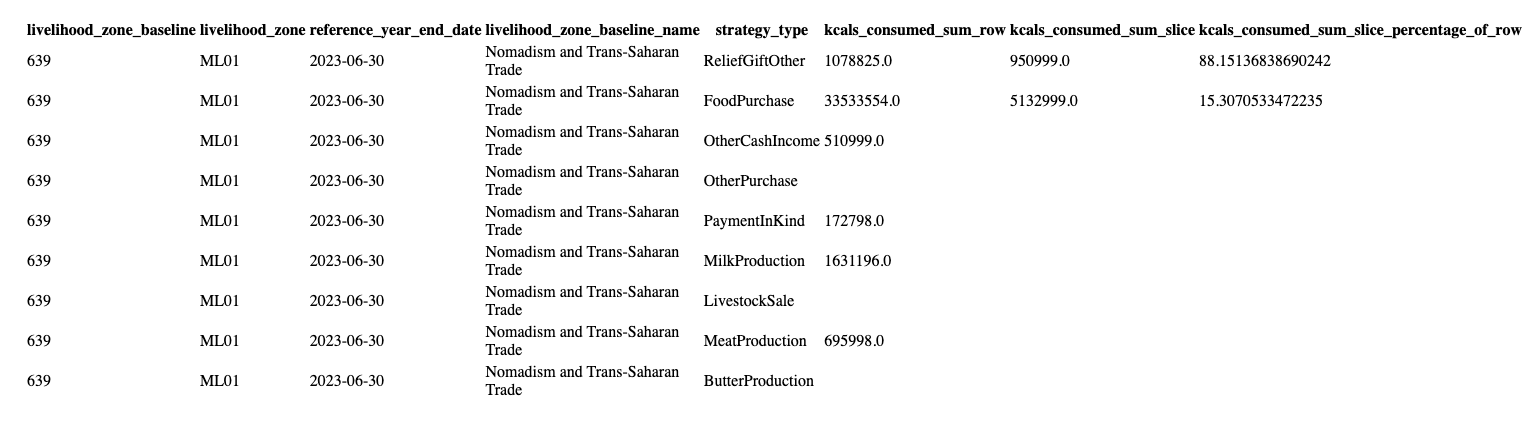
https://livelihoods.fews.net/api/livelihoodactivitysummary.html?livelihood_zone_baseline=639&scenario=baseline&fields=livelihood_zone_baseline,livelihood_zone,reference_year_end_date,livelihood_zone_baseline_name,strategy_type,product&slice_by_product=R01
If product is added to the fields list, the data is now broken down by product.
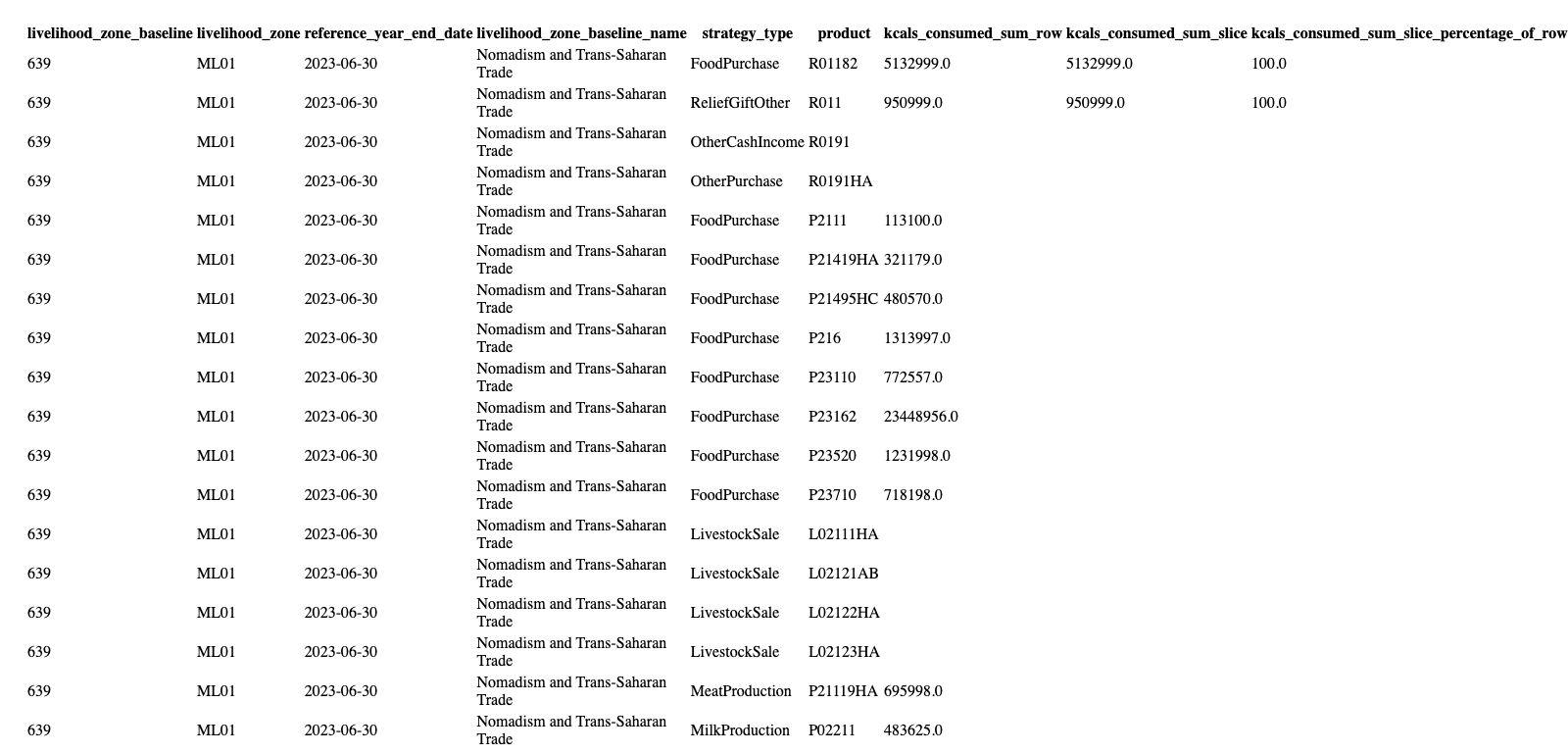
Because slice_percentage_of_row shows the percentage of the total row value contributed by the slice, if the slice field (product and/or strategy type) is also in the &fields parameter, then the slice_percentage_of_row values will be either 0 or 100%, depending on whether the field value in this row matches the slice.
Example
In the example above, a slice_by_product filter is included.
In the first set of results, where product is not included as a field, the kcals_consumed_sum_slice_percentage_of_row values include 88 and 15.
In the second set of results, where product is included as a field, the kcals_consumed_sum_slice_percentage_of_row values are all either 100 or 0.
Language
Translated fields (e.g. name, description) are rendered in the currently selected locale if possible. These can be set using &language= (e.g. &language=pt). Country is an exception as it has different translations that follow ISO standards.
Language options include:
-
ar(Arabic) -
en(English, default) -
es(Spanish) -
fr(French) -
pt(Portuguese)
Ordering
This endpoint uses the standard ordering parameter. If none are specified, the results are sorted by the aggregations descending (i.e., biggest percentage first).