

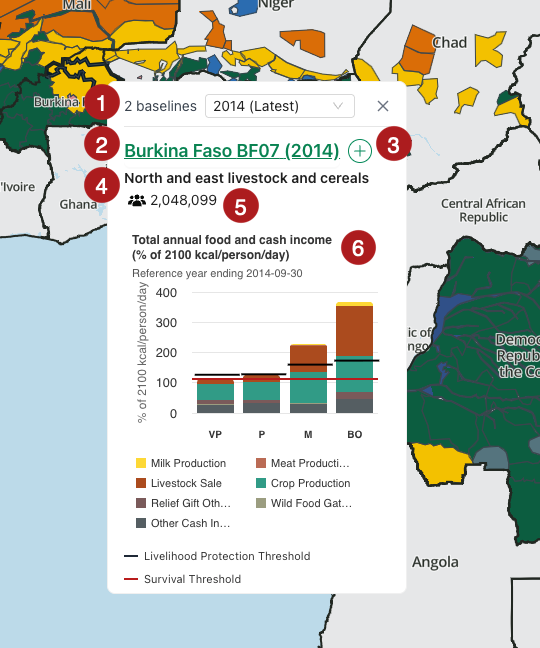
Click on a Livelihood Zone to access the Quick View card. This card includes:
-
List of Baselines for that Livelihood Zone
-
Livelihood Zone code
-
Button to add the Baseline to the Compare view
-
Short descriptive name for the Livelihood Zone
-
Livelihood Zone total population
-
Graph showing the annual sources of total income (kcals + cash) for the Livelihood Zone
You can interact with the Quick View card in the following ways:
-
Change Baselines: If a Livelihood Zone has more than one Baselines associated with it, you can easily switch between them using the drop down menu in the Quick View card.
-
Open the Baseline Summary: Clicking on the Livelihood Zone code will open the Baseline Summary in the sidebar.
-
Add to the Compare view: Clicking on the Add button will add the Livelihood Zone Baseline to the Compare view.
-
Interact with the graph: Hover over the bars in the graph to see exact values. Click on an item in the legend to hide it from the graph.